In Hadoop Cluster, it
is possible to add/decompose nodes to existing hadoop cluster without shutting
down or restarting any service.
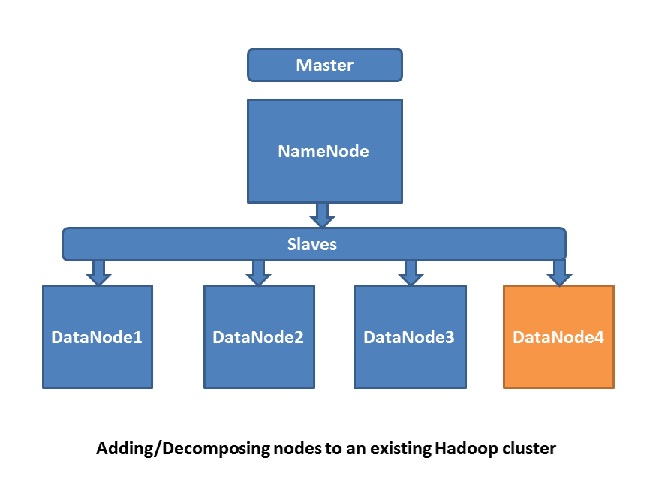
Adding new nodes to an existing cluster
Here we are assuming
that Hadoop cluster up and running. Also
all the configuration is as per Hadoop Cluster Environment Setup.
Suppose we are having
one NameNode, one SecondaryNameNode and three DataNode.
Server Name
|
Action Item
|
Dedicated Machines
|
NameNode
|
Will run the NameNode and JobTracker
services
|
1
|
SecondaryNameNode
|
Will run the Secondary NameNode service
|
1
|
DataNode(n)
|
Will run the TraskTracker and DataNode
services
|
3 or More
|
Steps to add new nodes to an existing cluster
1. Edit slave
configuration file of NameNode and add new node hostname to it. E.g. Here we are adding new node DataNode4 to slave configuration file.
$ vi conf/slaves
DataNode1
DataNode2
DataNode3
DataNode4
2. Start the DataNode and
TraskTracker services of new node. Also I am assuming here SSH is configured onto
new machine.
$ ssh hadoop@ DataNode4
$ cd $HADOOP_HOME
$ bin/hadoop-daemon.sh
start datanode
$ bin/hadoop-daemon.sh
start tasktracker
In order to add the new
node to the cluster without having to restart all of the Hadoop services, we
logged into the new node, and started the DataNode and TraskTracker services
manually. When you add a new node to the cluster, the cluster is not properly
balanced. HDFS will not automatically redistribute any existing data to the new
node in order to balance the cluster. To rebalance the existing data in the
cluster, we need to run the following command from the NameNode (Master Machine).
$ cd $HADOOP_HOME
$ bin/start-balancer.sh
Rebalancing a Hadoop
cluster is a network-intensive task. Imagine, we might be moving terabytes of
data around, depending on the number of nodes added to the cluster. Job
performance issues might arise when a cluster is in the process of rebalancing,
and therefore regular rebalancing maintenance should be properly planned.
Safely decommissioning nodes
Here assuming that in
existing Hadoop Cluster two properties dfs.hosts.exclude and mapred.hosts.exclude are
configured in mapred-site.xml.
<property>
<name>dfs.hosts.exclude</name>
<value>/path/to/hadoop/dfs_excludes</value>
<final>true</final>
</property>
<property>
<name>mapred.hosts.exclude</name>
<value>/path/to/hadoop/mapred_excludes
</value>
<final>true</final>
</property>
In addition, there
should be two files located in the Hadoop home
folder on the Master Node dfs_excludes and mapred_excludes.
Steps to decompose nodes to an existing cluster
1. Edit the dfs_excludes and mapred_excludes and add
the hostname of the node you want to decompose. Assume DataNode4 node, we are
decomposing.
$ vi $HADOOP_HOME/dfs_excludes
DataNode4
$ vi $HADOOP_HOME/mapred_excludes
DataNode4
2. From Master Node, we need to execute the below
command to notify the NameNode to re-read the exclude list and disconnect the
worker node which will be decommissioned.
$ hadoop dfsadmin
–refreshNodes
3. Notify the JobTracker to re-read the exclude
list and disconnect the worker node which will be decommissioned.
$ hadoop mradmin
–refreshNodes
4. Verify the status of
the decommissioning process by executing the below command.
$ hadoop dfsadmin –report
Thus, first we added
the hostname of the node we wanted to decommission to the dfs_excludes and mapred_excludes files. Then, we executed
the hadoop dfsadmin –refreshNodes command
to notify the NameNode to disconnect from all of the hosts listed in the dfs_excludes file.
Similarly, we executed the hadoop mradmin – refreshNodes command to notify the JobTracker to stop using the
TaskTrackers on the nodes listed in the mapred_excludes
file.
Hope you have enjoyed the article.
Author: Iqubal Mustafa Kaki, Technical Specialist.
Want to connect with me
If you want to connect with me, please connect through my email - iqubal.kaki@gmail.com
Want to connect with me
If you want to connect with me, please connect through my email - iqubal.kaki@gmail.com
